


Android Auto
4.1488.70K Reviews
App Specs
- Version
- Varies with Device
- Updated On
- License
- Free
- Downloads
- 10,000,000,000+
- Developer
- Google LLC
- Categories
- Auto & Vehicles
- Platform
- Android
Screenshots
 Analysis by AppCompare
The first few drives with Android Auto can make an ordinary dashboard feel newly useful. Instead of reaching across for a phone to check a route or choose a podcast, I can put familiar driving tasks on the car’s screen and use voice controls for some interactions. The appeal is immediate, but the more important question is whether it becomes a comfortable habit rather than a novelty. For me, the answer depends less on how many features it offers than on whether my car, phone, and usual apps work smoothly together.
Why the first week feels different
On an early commute, the benefit is easy to notice: I can start navigation before pulling away, pick something to listen to, and keep the phone tucked out of reach. That makes the drive feel more organized without asking me to learn an entirely new system. Android Auto is a free driving app from Google LLC, and its focus is practical: bring selected phone activities into a car-friendly experience rather than turn the dashboard into another general-purpose screen.
The first setup is also a useful reality check. The experience depends on a compatible car or stereo and a suitable Android phone; this is not a feature that appears on every dashboard just because the app is installed. Before planning around it, I’d check the vehicle’s manual or manufacturer information and confirm that the phone meets the current requirements. If your car does not support Android Auto, using a phone mount with a navigation app may be the more realistic option.
Guides and Analysis on Android Auto
What keeps it useful after the novelty fades
Repeated trips are where the app makes its case. I find its value strongest when I have a predictable routine: a commute, regular errands, or frequent drives to places I do not know well. Navigation, audio, calls, and messages are tasks I would otherwise manage separately, and having a consistent place to reach them can reduce the temptation to handle the phone directly. The usefulness is not that every drive becomes exciting; it is that the small steps before and during a drive can become less fiddly.
It also suits people who already use Google’s services and compatible media or messaging apps. If your saved places and listening habits live elsewhere, you may need to adjust your routine or keep using the services that work for you. I would not choose it just because it is popular; I would choose it if its dashboard experience fits the way I already navigate and listen.
A realistic day behind the wheel
Imagine leaving work for a grocery stop before heading home. I can set the destination while parked, let navigation guide the unfamiliar turn, then use voice controls to respond to a message or make a call when it is appropriate to do so. Once parked, I can change the route or choose a different audio program without trying to operate the phone in traffic. That sequence is more useful than any single feature because it helps keep small decisions from piling up while I drive.
Voice control is helpful, but I treat it as an option, not a guarantee that every request will be understood perfectly. Names, noisy cabins, unclear speech, or an unexpected request can make voice interaction less convenient than it sounds. If a task needs repeated corrections, I’d leave it until I am safely parked. The app can support a less distracting routine, but it cannot make every interaction safe by itself; the driver still has to decide when to stop engaging.
Worth Reading Before You Choose

Baby Panda World Brings Quick Play to Modern Phones, but Its Game Library Feels Busy

QuizzLand Review: A Good Fit for Short Trivia Breaks, Not Every Player

Basketball Stars: Multiplayer Is Fast, but Can It Recover When Matches Go Wrong?

Link to Windows Runs on Shared Habits, Not Social Feeds

How Alibaba.com Dominates the B2B Marketplace

Metro's Quiet Rise: Redefining Mobile Communication
How it compares with simpler alternatives
Compared with using a phone directly, Android Auto can put supported controls in a layout intended for the car and make voice access easier. A phone mounted on the dashboard may be enough for someone who only needs directions and prefers a familiar mobile interface. The trade-off is that a mount does not necessarily bring the same integrated access to supported calling, messaging, and media controls. On the other hand, a car’s built-in infotainment system may suit drivers who prefer its controls or whose phone setup is inconsistent.
I see Android Auto as a bridge between those approaches, not an automatic replacement for every car system. If your built-in navigation works well and you rarely use phone-based media or messaging, adding another interface may not improve your routine. If you rely on your phone for directions and audio, the dashboard integration can be a more natural fit. Testing your normal route and most-used apps is a better measure than judging it by a feature list.
Small habits that make a difference
A little preparation can prevent much of the friction. I’d choose a playlist or podcast before moving, save regular destinations in the navigation app I use, and make sure the phone is positioned or connected in the way the car supports. If a cable is part of your setup, keeping a dependable one in the vehicle avoids turning a routine trip into a last-minute search. These are ordinary habits, but they matter because the app is most useful when it is ready before the car starts moving.
It is also worth reviewing which notifications you want to hear and which conversations can wait. A spoken message may be less visually distracting than reading a screen, but hearing every alert can still pull attention away from driving. I prefer to treat messaging as an occasional convenience rather than something to keep up with continuously. For a long trip, deciding on audio and likely stops in advance can make the interface feel calmer and reduce the urge to keep changing things.
Where the experience can wear thin
The main trade-off is dependence on several pieces working together: the phone, the vehicle, the connection, and the services you want to use. A weak connection can limit online navigation or streaming, while differences between cars can change how the interface feels. Setup may be straightforward in one vehicle and less satisfying in another. If your display is awkwardly placed, controls are unfamiliar, or the system frequently interrupts your routine, the theoretical convenience may not translate into a better drive.
There is also a risk of mistaking more access for less distraction. A screen that makes it easy to switch audio or check an alert can still invite unnecessary interaction. I would skip using it as a reason to stay reachable on every trip, and I would not expect voice commands to replace attention or good judgement. Drivers who want a completely quiet cabin, rarely use navigation, or prefer their car’s own interface may get little lasting value from adding it to their routine.
A useful long-term measure
I judge a driving app by whether I stop thinking about the setup and simply use it when it helps. Android Auto has an average rating of 4.1 from around six million ratings, and it has more than ten billion installs; those figures show how widely it is used, but they do not guarantee that it will suit a particular dashboard. It is rated for Everyone, is free, and has been available since March 19, 2015. Its minimum Android requirement is version 9, so checking your phone’s software and your vehicle’s compatibility before relying on it is sensible.
For a driver with a compatible setup and a regular need for maps, media, or hands-free access, it can earn a lasting place by making familiar journeys easier to manage. For someone whose car system already does the job, or whose phone and vehicle do not cooperate reliably, the simplest alternative may be better. I would give it a fair trial on everyday routes, not just a long road trip, and keep it only if it reduces hassle without encouraging more screen time.
Seamless Integration with Your Car
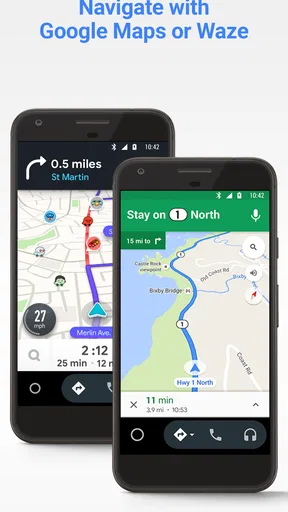
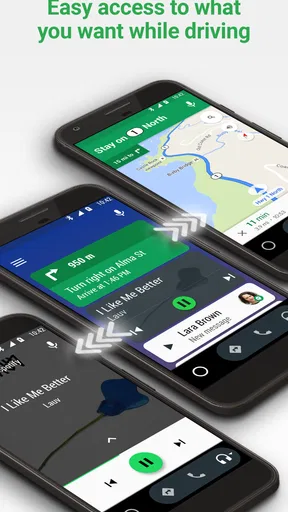
Okay, let’s dive in. The first time I hooked up my phone to Android Auto, it felt like stepping into a futuristic world. The app beautifully mirrors your phone’s key features right onto your car’s display. With Android Auto, you get access to Google Maps, music apps like Spotify, and even messaging services – all in one place. It’s like having a Swiss Army knife for your car dashboard.
Navigation at Its Best
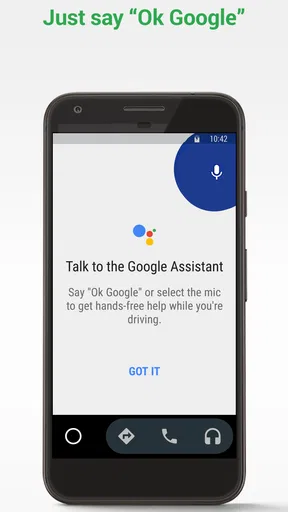
Let’s talk navigation. Google Maps on Android Auto is a dream. It provides real-time traffic updates, alternative routes, and even alerts for those sneaky speed cameras. I’ve never felt more in control and informed on the road. The voice-guided navigation is a lifesaver, especially when you’re driving in unfamiliar territory. Just say, "Okay Google," and ask for directions. It’s that simple.
Music and Entertainment
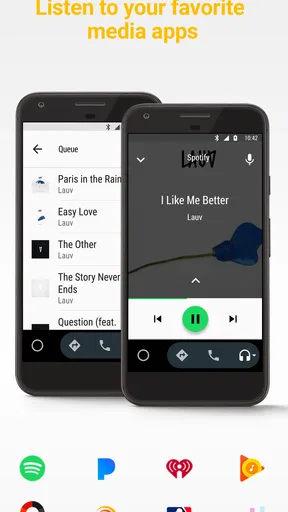
Now, if you’re anything like me, music is essential for any journey. Android Auto supports a range of music apps like Spotify, Pandora, and YouTube Music. The interface is intuitive, and switching between playlists or podcasts is a breeze. Honestly, I’ve discovered so many new artists just by letting it shuffle through my playlists during long drives.
Keeping Connected Safely
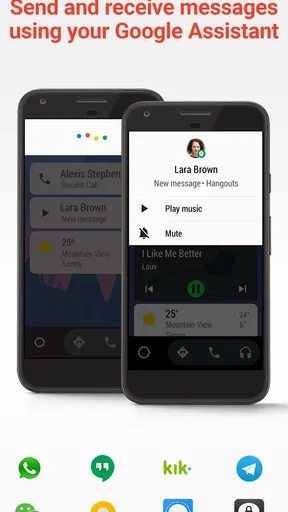
Staying connected while driving can be tricky, but Android Auto manages this elegantly. You can send and receive messages without taking your eyes off the road. The app reads your incoming texts aloud and lets you reply by voice. It’s like having a personal assistant who’s always ready to help. Plus, with the Do Not Disturb feature, you can avoid distractions during those moments when you need full concentration.
Hands-Free Calling
Making calls on the road is a breeze with Android Auto. You can easily access your contacts and make calls using voice commands. This feature is incredibly handy, especially when you need to make an urgent call or answer an incoming one while keeping your hands on the wheel.
Easy Setup and Compatibility
Setting up Android Auto is straightforward. All you need is a compatible car and a smartphone running Android 5.0 (Lollipop) or higher. Connect your phone to your car using a USB cable, and voilà! You’re ready to explore the features. The app is compatible with most car models and aftermarket stereos, so there’s a good chance it’ll work with your vehicle.
One thing to keep in mind is that the experience can vary depending on the car model. Some older models might not support all features, but most newer vehicles handle it smoothly. Also, a reliable internet connection is essential for accessing maps and streaming services.
Final Thoughts
So, is Android Auto worth it? Absolutely! It’s a fantastic tool that enhances your driving experience by keeping you connected, entertained, and informed. It’s designed to make your life easier and your drives more enjoyable. Whether you're commuting to work or embarking on a road trip, Android Auto is a trusty companion that won’t let you down.
If you haven’t tried it yet, I highly recommend giving it a spin. You might just find that you never want to drive without it again.
Pros
- Seamless integration with car systems.
- Supports voice commands for hands-free use.
- Access to a wide range of apps.
- Frequent updates enhance functionality.
- User-friendly interface with intuitive design.
Cons
- Limited compatibility with older car models.
- Some apps may not be fully supported.
- Occasional connectivity issues.
- Requires a compatible smartphone.
- Limited customization options.
FAQs for Android Auto
What is Android Auto and how does it work?
Android Auto is a mobile app developed by Google to enhance your driving experience by integrating your Android device with your car’s infotainment system. It provides easy access to navigation, calls, texts, and music through a simplified interface or voice commands, minimizing distractions and keeping your focus on the road.
Which cars and phones are compatible with Android Auto?
Android Auto is compatible with most Android phones running version 6.0 (Marshmallow) and above. As for vehicles, a wide range of car manufacturers support Android Auto, including brands like Ford, Honda, and Volkswagen. Always check with your car manufacturer for specific compatibility details.
How do I set up Android Auto in my car?
Setting up Android Auto is straightforward. First, ensure your phone has the Android Auto app installed. Connect your phone to your car using a USB cable or Bluetooth, depending on your car’s capabilities. Follow the on-screen instructions on your car’s display and grant necessary permissions on your phone.
Can Android Auto be used wirelessly?
Yes, Android Auto can be used wirelessly, but this feature is limited to certain phones and car models. You need a phone running Android 11 or newer, and your car must support wireless Android Auto. If compatible, you simply need to connect via Bluetooth and Wi-Fi, without the need for a USB cable.
Is it safe to use Android Auto while driving?
Android Auto is designed with safety in mind. It minimizes distractions by offering a streamlined interface and voice commands, allowing you to access essential features without taking your hands off the wheel or eyes off the road. However, it’s crucial to stay attentive and use these features responsibly.


